





February 18, 2026
PointsYeah Travel Radar: A DIY Award Calendar
Megan K.
If you’re a traveler with a fairly flexible schedule and know where you want to go, points search engine PointsYeah has a new tool to help you find and book that dream trip. PointsYeah is a beginner-friendly points aggregator site. I’ve found it very useful in planning my travels and bought my own premium subscription. No points search engine is perfect or has every airline program, so you may need to use additional search tools to find what you’re looking for. (Pam uses it constantly to plan her trips too!)
Launched in September 2025, Travel Radar is a feature within PointsYeah (for paid subscribers) that allows you to set up a personalized, year-long award calendar for the routes you want to travel. You can set these calendars up for up to four routes at a time. The calendar shows an at-a-glance view of the points price on the route you want to fly, in the cabin you’re looking for, with the points you have. The routes can update your radar if points prices drop.
This feature could be especially useful for travelers who fly the same route regularly and want to find the best deal or who know exactly where they want to go but are flexible with dates. It could work well for a traveler like Pam, who has a flexible schedule and visits her London-based daughter.
In this post, I’ll walk you through how to set up and use your own Travel Radar.
Setting up Travel Radar: International Redemption
If you’ve set an alert on PointsYeah, setting up your Travel Radar is a similar process.
On the PointsYeah home page, click the sliding scale icon in the top, right corner. Click Travel Radar. Select the Create Travel Radar button.
Here you fill in all the details, just as you would if you were setting up a flight alert. You’ll select:
- Origin and destination cities
- Preferred cabin(s)
- Maximum number of points per person
- Maximum you’re willing to pay in taxes
- Number of stops
- What type of points you have
- Which airline(s) you want to fly (if applicable)
You can also add flight numbers or exclude certain airlines.
Once you create the alert, PointsYeah will give you a pop-up indicating that your radar has been created.
If you go back to your Travel Radar page, you will see a message that says, “No eligible flight is available. Don’t worry, we will continue to search for you.” This is normal, even if your route has widespread availability. It takes time for Travel Radar to put your calendar together. You’ll receive an email when it’s ready.
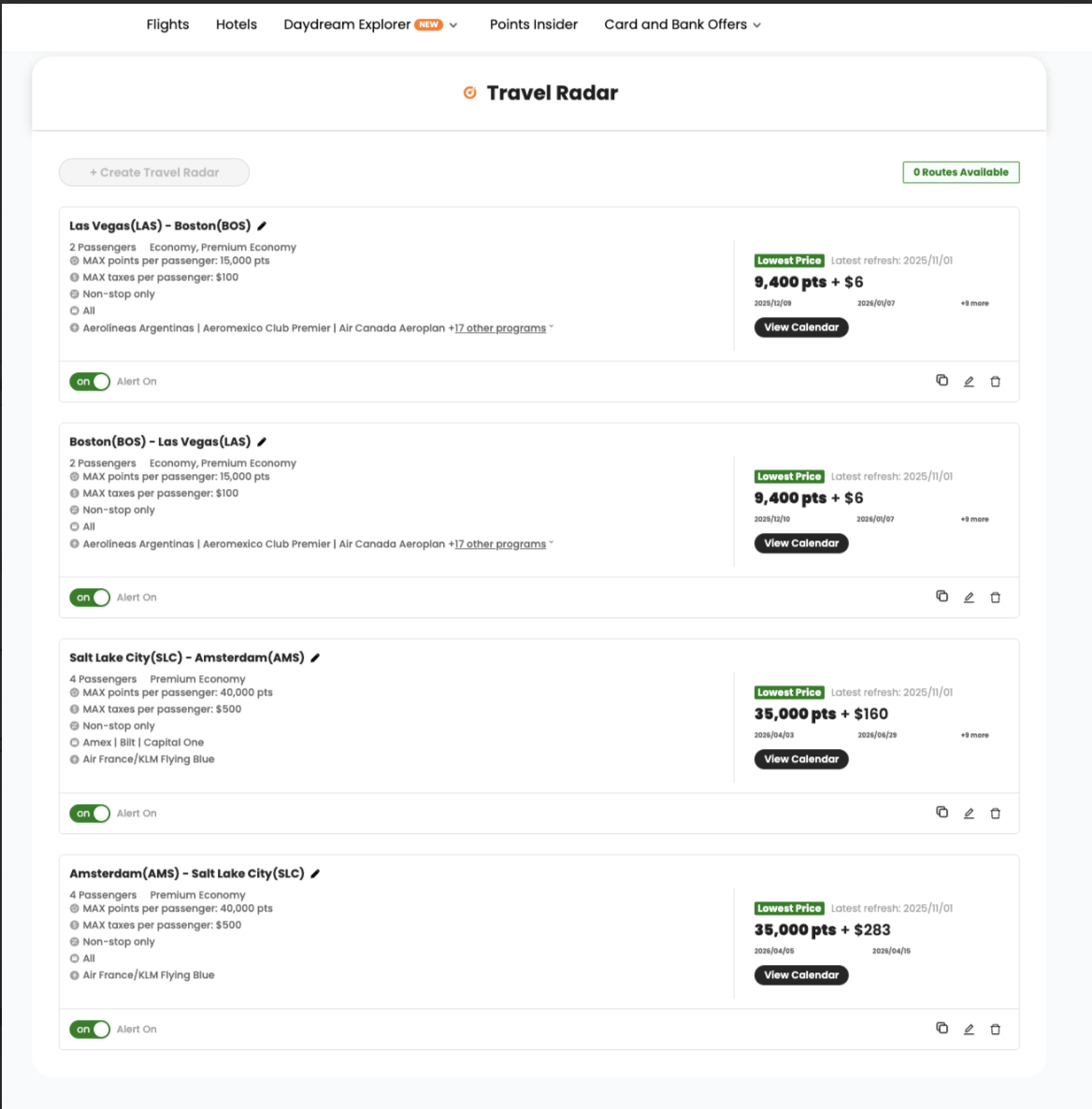
For this test radar, I’m searching:
- Salt Lake City to Amsterdam (a route Alex flew with her family)
- Non-stop
- Premium Comfort (KLM’s term for premium economy)
- Two adults and two children
- Up to $500 in taxes per person
- American Express, Bilt, or Capital One points (all of which transfer to Air France-KLM’s Flying Blue program)
Then, I set up a second one with identical requirements except the opposite direction, from Amsterdam to Salt Lake City.
I set this alert around 8:00 on a Saturday morning and waited for the calendar to arrive in my inbox.
About six hours later, I had the first results. There were a few dates (interestingly right around spring break time) that had the less expensive price of 40,000 points per person plus $160 in taxes. By the time I got back to PointsYeah Saturday evening and did a real-time search, some of those dates were gone, and others (in that same April 2026 timeframe) had become available. That shows the importance of always running a real-time search and validating availability on an airline’s website before transferring points.
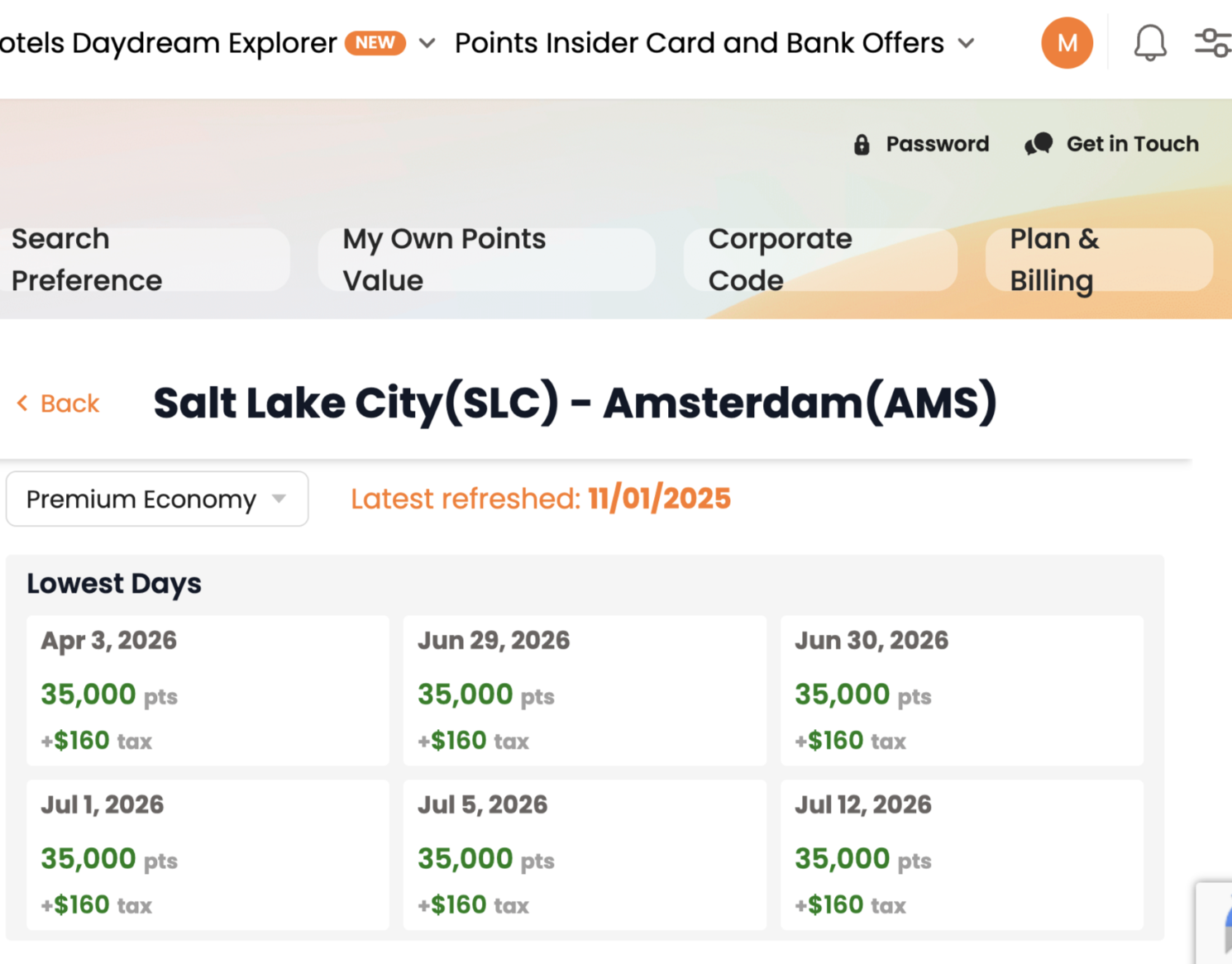
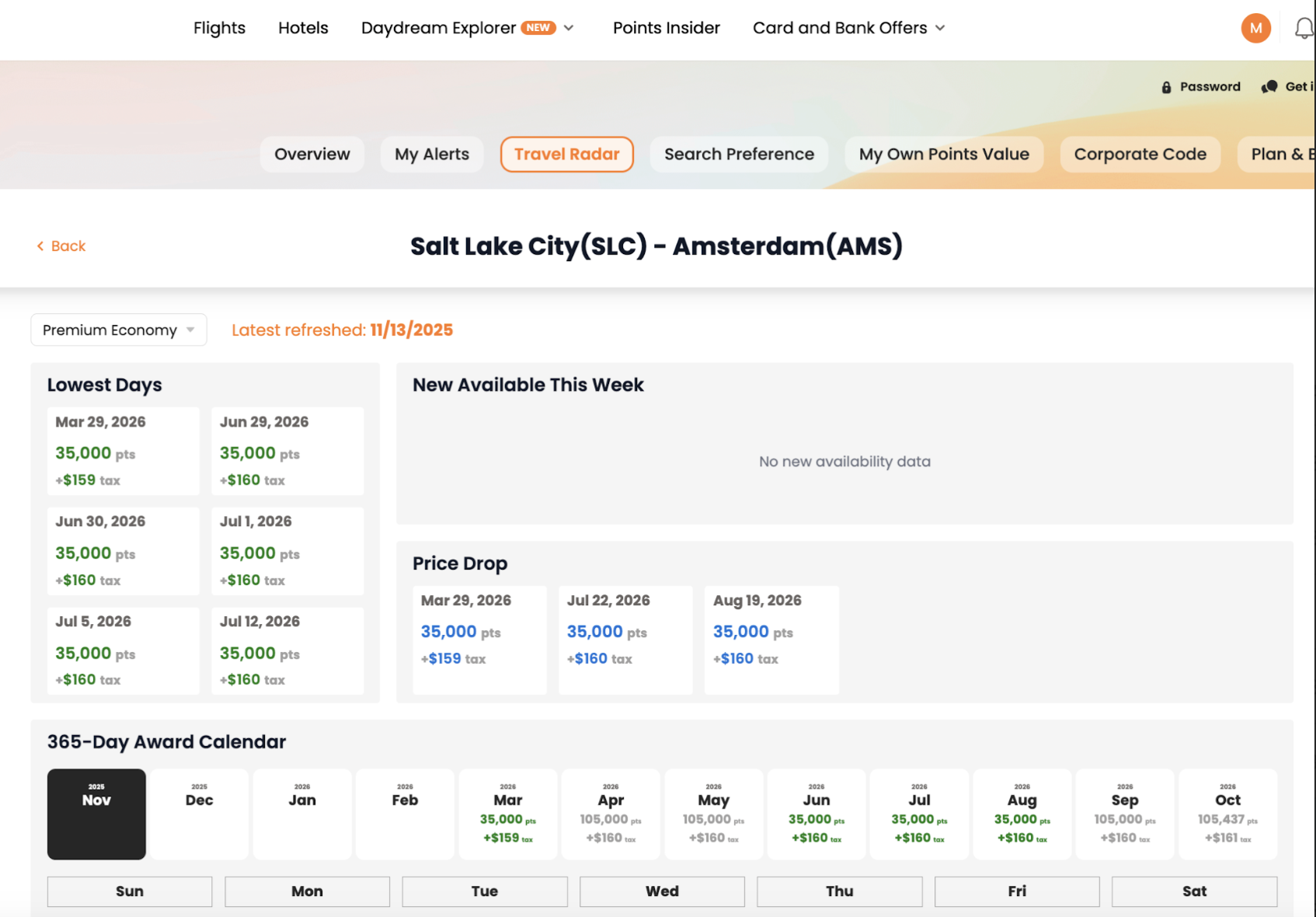
When PointsYeah’s real-time search showed availability for Friday, April 3, I went to KLM’s website to verify, and it was there: four passengers for 140,000 points plus $642. This is a solid price at a high-demand time.
For a return flight, the only date I could find was Wednesday, April 15. That’s probably longer than the average family has time to spend in Europe. However, if I were booking this, I’d book the flight to Europe to start with and then set up a traditional email alert on PointsYeah (or another site) for a few dates I’d be willing to fly home and see what I could find. You could always switch to economy class or fly home out of a different city in Europe.
I left the calendar on for a few weeks and continued to get regular updates as prices and availability changed from day-to-day.
Domestic Redemption Example: Boston to Las Vegas
You can also use Travel Radar to track domestic point redemptions. As I mentioned earlier, no service searches all available airlines. I’ve never found a Southwest flight on PointsYeah, for example. So if Southwest flies the route you’re looking to travel, you’d want to search that separately on Southwest’s site.
For this domestic redemption test, let’s say I’m in Boston looking to visit Las Vegas, but I’m flexible on dates. I set up my Travel Radar for two adults in economy or premium economy. I’m looking for a non-stop flight for up to 15,000 points per passenger. I then set up duplicate radar for the other direction.
About seven hours later, I had my calendar for this route. Given that these are two larger U.S. cities, there was plenty of availability. But the price varies, so the Travel Radar was helpful for seeing at-a-glance which were the best days on points. (Not surprisingly, the least expensive days were generally Tuesday and Wednesday.)
I found several dates as low as about 8,000 points.
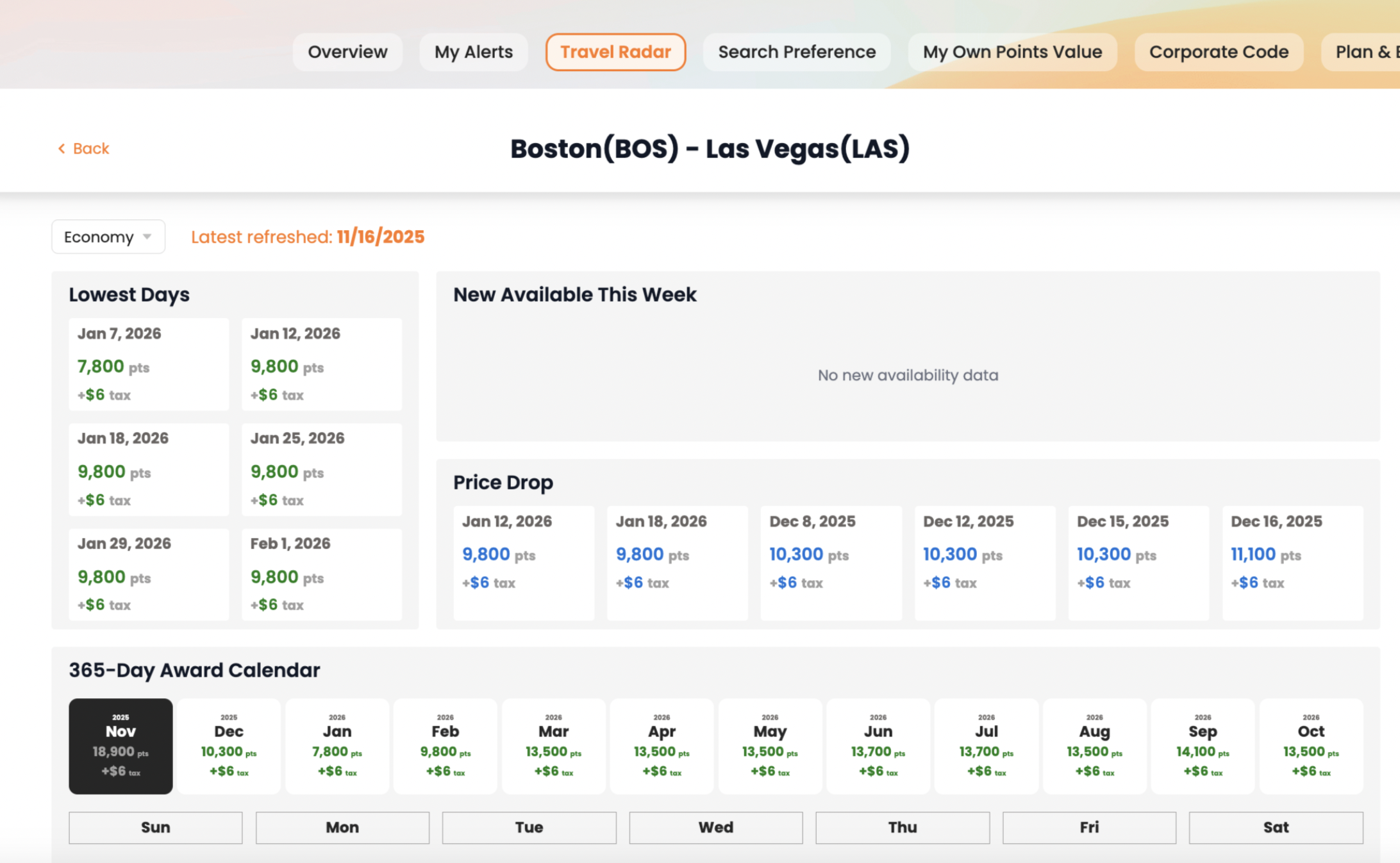
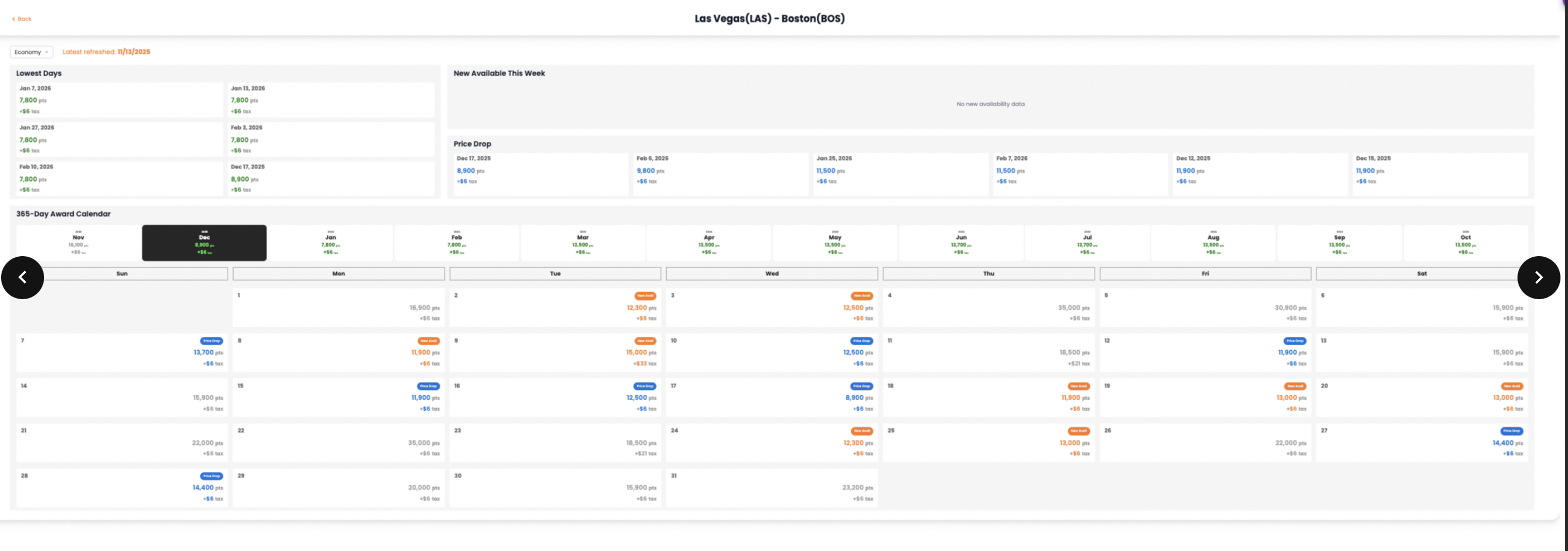
Just as with my international calendar, I continued to receive updates as prices and availability changed, so this feature can be useful for long-term travel planning.
Travel Radar Tips
- Know what you’re looking for. If you’re putting in routes that don’t exist or using too many strict parameters, the tool won’t work well. Check flightconnections.com first to verify the routing. I also find it helpful to search the airline’s website to get a general idea of the points price and taxes/fees before putting the maximum of each I’d be willing to pay into Travel Radar.
- Always verify availability with the airline before transferring points. Just because award space is showing on a tool like PointsYeah doesn’t mean it’s still there. Verify first, then transfer.
- Be patient. If you have some time, let the tool work for you for a few weeks, or even a few months, to give yourself as much information as possible. You can always book the “good enough” ticket and keep an eye out for something better. (Just keep in mind any cancellation fees and that if you cancel, your points will remain with that airline.)
Bottom Line
While not a perfect solution for every traveler, PointsYeah’s new Travel Radar could help you find your next redemption. Are you using this tool? If so, let us know in the comments!
Related Posts
Open Hotel Alert to Find Award Nights
The Value of Flight Award Alerts


Opinions, reviews, analyses & recommendations are the author’s alone, and have not been reviewed, endorsed or approved by any of these entities. American Express is a Travel Mom Squad advertiser, but we always show the best public offer even when we don’t earn a commission. Terms Apply.
Leave a Reply


Advertiser Disclosure: Points Talk Squad has partnered with CardRatings for our coverage of credit card products. Points Talk Squad and CardRatings may receive a commission from card issuers when a customer clicks on a link, when an application is approved, or when an account is opened. This compensation may impact how or where products appear on this site. Points Talk Squad has not reviewed all available credit card offers on this site.
Editorial Note: Opinions expressed here are author's alone, not those of any bank, credit card issuer, hotel, airline, or other entity. This content has not been reviewed, approved or otherwise endorsed by any of the entities included within the post.
be the first to comment
Responses are not provided or commissioned by the bank advertiser. Responses have not been reviewed, approved or otherwise endorsed by the bank advertiser. It is not the bank advertiser’s responsibility to ensure all posts and/or questions are answered.