




November 25, 2026
Step By Step: Using the $500 The Edit Credit
Pam
One of the benefits of the Chase Sapphire Reserve® and Sapphire Reserve for Business℠ that I think deserves more attention is the annual $500 hotel credit for stays booked through The Edit by Chase Travel℠. With the higher annual fees on these cards, I want to make sure I’m getting as much value as possible from every benefit, and this is one that can really help offset the cost of a luxury hotel stay.
The Edit is Chase’s collection of luxury hotels and resorts around the world. Think beautiful properties, complimentary breakfast, hotel credits, and potential room upgrades. It reminds me of the Fine Hotels + Resorts® bookings you can make through American Express Travel®, which I’ve used and enjoyed for years.
The good news is that both the personal and business Sapphire Reserve cards offer this benefit, and the booking process is essentially the same. Here’s exactly how to use it.
First, Understand How the $500 Credit Works
For 2026, each eligible Sapphire Reserve account offers up to $500 in annual statement credits for The Edit bookings, but there are a few important rules.
- The $500 is divided into two credits of up to $250 each.
- Each qualifying reservation must be at least two consecutive nights.
- You must book through The Edit on Chase Travel℠.
- You must select a prepaid Pay Now rate and use your eligible Sapphire Reserve card.
- You can use both $250 credits at any time during the calendar year, but they must be applied to separate transactions.
- The credits are based on when you make the qualifying purchase, not when you actually stay at the hotel.
If you have both the personal and business Sapphire Reserve cards, each account has its own $500 annual credit. That means you could potentially receive $1,000 in credits between the two cards in one year!
Step 1: Log In to Chase Travel℠
Start by logging into your Chase account and navigating to Chase Travel℠. Make sure you’re using your Chase Sapphire Reserve® or Sapphire Reserve for Business℠ account.
Before booking, I recommend checking your card’s benefits dashboard to see how much of your annual The Edit credit you have remaining.
Step 2: Search for Hotels in The Edit
Enter your destination, travel dates, and number of guests in the hotel search section.
Look for hotels labeled The Edit in your results. You can also browse the featured The Edit properties or use the available filters to narrow your search.
Not every hotel listed on Chase Travel℠ participates in The Edit, so don’t assume that booking an expensive hotel automatically qualifies for the credit. Make sure you see a “The Edit” designation before moving forward.
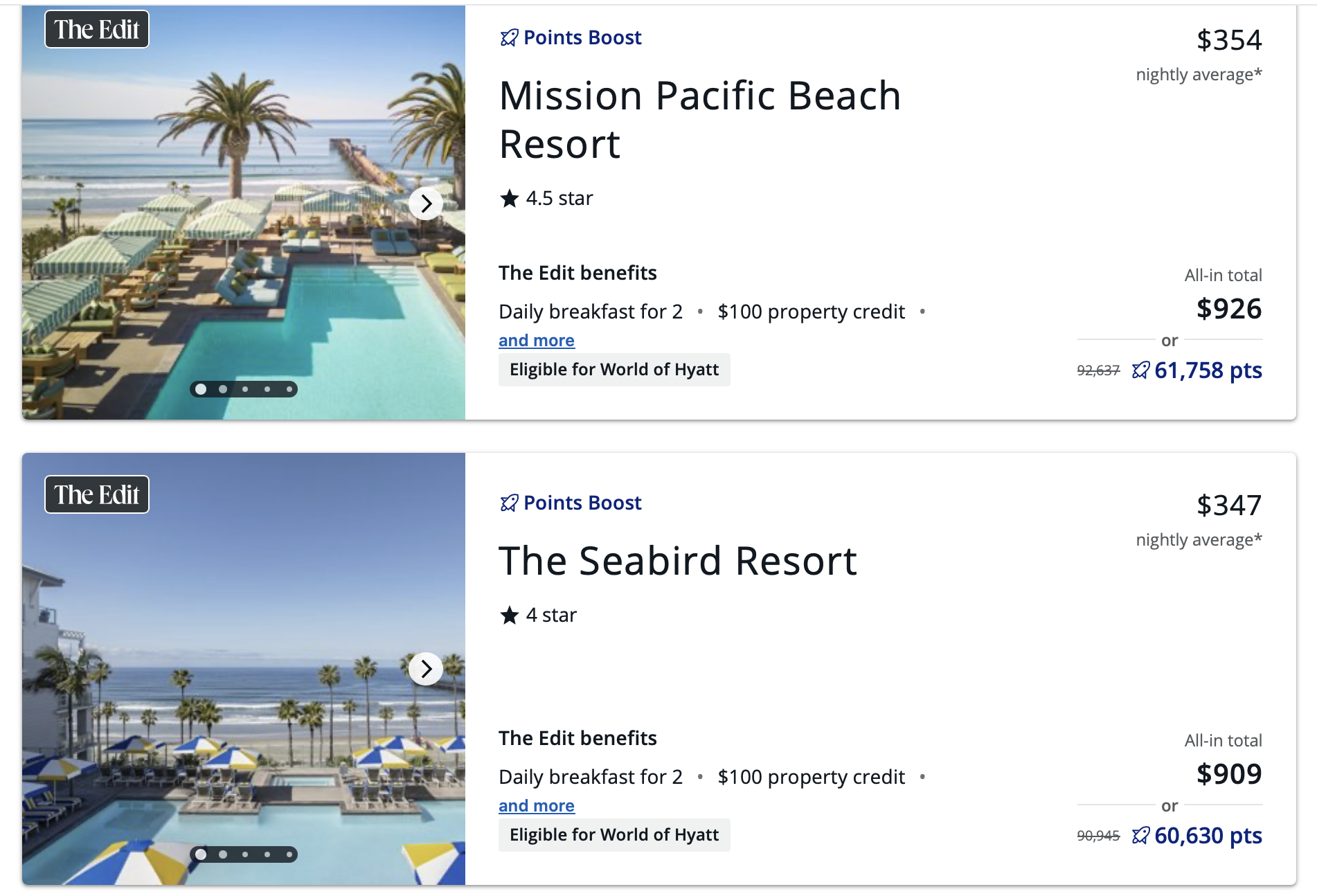
You need to see The Edit listed.
Step 3: Compare Prices Before Booking
This is something I always recommend doing, even when there’s a statement credit involved. Just because Chase is giving you $250 back doesn’t necessarily mean you’re getting the best deal.
Compare the price on Chase Travel℠ with the hotel’s direct booking rate. I also check whether I could book the same property using hotel points or using a credit from another program with similar benefits.
For example, if Chase Travel℠ charges $800 for two nights and the hotel charges $750 directly, the $250 credit still makes the Chase booking attractive. But if the Chase rate is significantly higher, the savings may not be as impressive.
Remember, we’re trying to save money on travel, not spend more just because we have a credit!
Step 4: Choose Your Room and Select Pay Now
Once you’ve found your hotel, select your room and review the rate and cancellation policy.
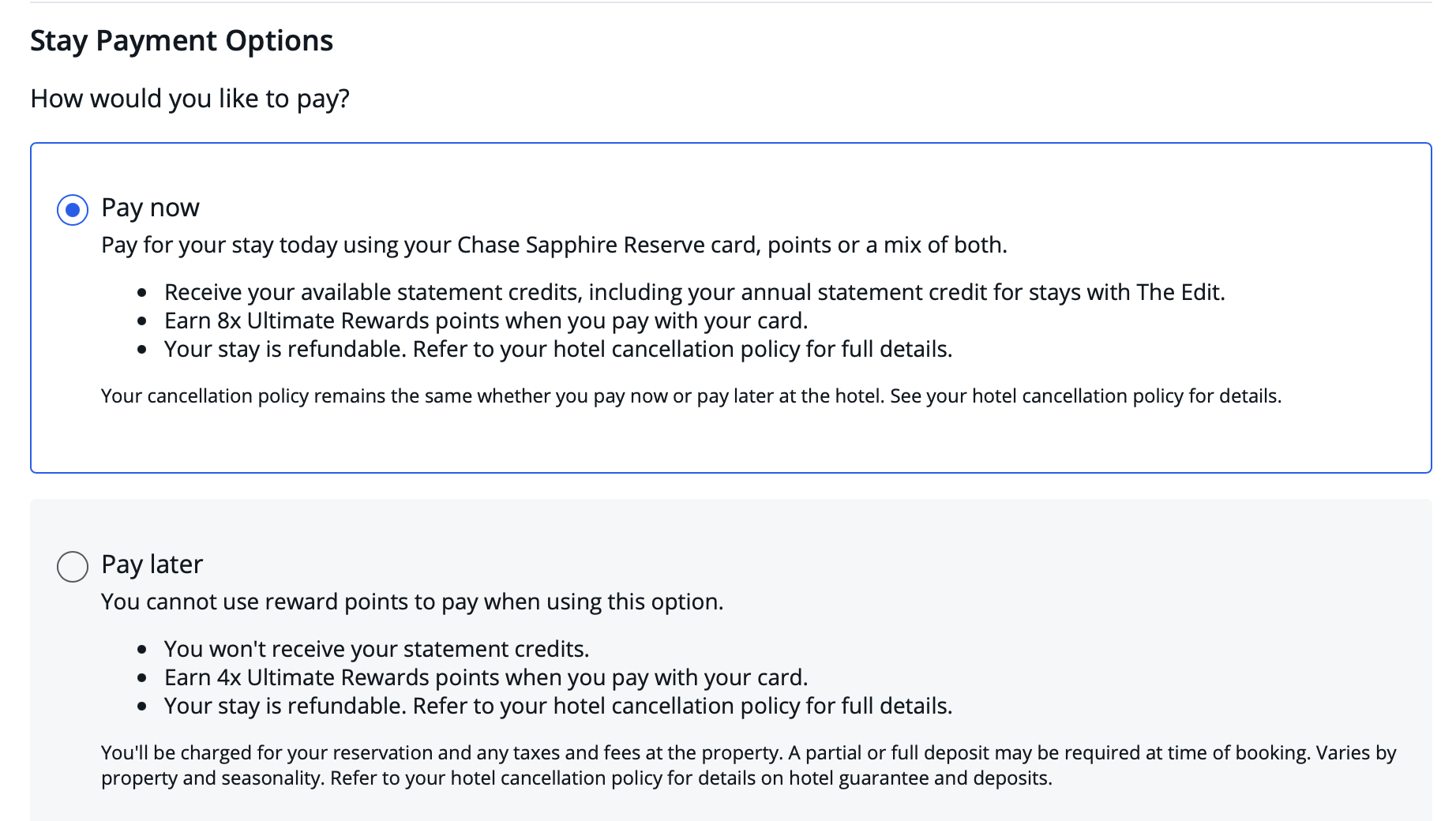
This next part is important: You must choose Pay Now rather than Pay Later. A reservation that you pay for directly at the hotel will not qualify for The Edit statement credit.
At checkout, use your eligible Chase Sapphire Reserve® or Sapphire Reserve for Business℠ card. You can use Chase Ultimate Rewards® points toward part of the booking, but you need an eligible charge on your card to trigger the statement credit. Personally, I’d generally rather save my transferable Chase points for a valuable airline or hotel redemption.
Step 5: Receive Your $250 Statement Credit
After making your qualifying prepaid reservation, Chase automatically applies a statement credit of up to $250 to your account. You don’t need to enroll or activate an offer.
For example, let’s say you book a two-night stay for $700.
Your cost would look like this:
- Hotel reservation: $700
- The Edit statement credit: $250
- Your effective cost: $450
You pay the full amount when booking, and Chase reimburses you through a statement credit. Credits often appear within a few business days, although Chase’s terms allow up to four weeks.
Step 6: Don’t Forget Your Additional The Edit Benefits
This is where the benefit gets even better. In addition to the $250 statement credit, The Edit reservations generally include some excellent hotel perks.
- Daily breakfast for two
- A property credit (typically $100 per stay) for eligible hotel expenses
- A room upgrade when available
- Early check-in and late checkout when available
- Complimentary Wi-Fi
Benefits can vary by property, especially at all-inclusive resorts, so review what’s included before booking.
I love a good hotel breakfast, and those property credits can be particularly useful for a nice dinner or spa treatment. Between the statement credit and the additional benefits, you can get some serious value from a two-night stay.
Step 7: Use Your Second $250 Credit
Don’t forget that you have another $250 available! You can book a second qualifying two-night stay later in the year, or even make two separate reservations for a longer trip.
For example, if you’re planning four nights at the same hotel, you could book two nights as one reservation and the following two nights as another. Each qualifying prepaid reservation could trigger its own $250 credit.
Chase clarified in August 2026 that back-to-back qualifying reservations can still receive separate credits. I’d still confirm the current terms before relying on this strategy and contact the hotel ahead of time to see whether you can stay in the same room.
What About the Sapphire Reserve for Business℠?
The process is the same for the Sapphire Reserve for Business℠, and the card has its own $500 annual The Edit credit in 2026.
One important distinction is that employee cards are not eligible for The Edit program benefits. The primary business cardmember must make the eligible booking.
And here’s something worth knowing: Beginning January 1, 2027, the Sapphire Reserve for Business is scheduled to increase its annual The Edit credit to $1,000, with a maximum of $250 per qualifying transaction. That’s a substantial increase for business cardholders who regularly stay at participating hotels.
A Few Mistakes to Avoid
Before you make a reservation, double-check that you’re not overlooking something that could cost you the credit.
- Booking a one-night stay instead of the required two nights.
- Choosing Pay Later instead of Pay Now.
- Booking directly with the hotel instead of through The Edit.
- Assuming every Chase Travel℠ hotel qualifies.
- Forgetting to use your second $250 credit before the end of the year.
- Not comparing the Chase rate with other available rates.
Also remember that the portion of your purchase reimbursed by The Edit credit does not earn Chase Ultimate Rewards® points. And if you cancel or modify a qualifying reservation, Chase may reverse the statement credit.
Bottom Line
I’ve always loved using points for luxury hotels, but I’m also a big believer in using the credits that come with our premium credit cards. After all, we’re paying substantial annual fees for these cards, and leaving $500 in hotel credits unused is not something I want to do!
The Edit credit is particularly appealing because you’re not just getting money back on a hotel reservation. You’re also getting benefits that can make the stay feel a little more special. And if you hold both the personal and business Sapphire Reserve cards, there are even more opportunities to save.
My advice is to look at trips you already have planned and see whether a participating The Edit property makes sense. You don’t need to create an entirely new trip just to use a credit, but you might find that a hotel you were already considering becomes a much better deal. Be sure and check out this post for multiple ideas from our community about where to use this credit!
Related Posts
Chase Sapphire Reserve for Business℠ Changes: More Hotel Credits, New Spending Cap
Review of Chase Sapphire Reserve®
Step by Step: Using the Fine Hotels + Resorts® Credit

Opinions, reviews, analyses & recommendations are the author’s alone, and have not been reviewed, endorsed or approved by any of these entities. American Express is a Points Talk Squad advertiser, but we always show the best public offer even when we don’t earn a commission. Terms Apply.
Leave a Reply


Advertiser Disclosure: Points Talk Squad has partnered with CardRatings and FinanceBuzz for our coverage of credit card products. Points Talk Squad, CardRatings, and FinanceBuzz may receive a commission from card issuers when a customer clicks on a link, when an application is approved, or when an account is opened. This compensation may impact how or where products appear on this site. Points Talk Squad has not reviewed or included all available credit card offers on this site.
Editorial Note: Opinions expressed here are author's alone, not those of any bank, credit card issuer, hotel, airline, or other entity. This content has not been reviewed, approved or otherwise endorsed by any of the entities included within the post.
be the first to comment
Responses are not provided or commissioned by the bank advertiser. Responses have not been reviewed, approved or otherwise endorsed by the bank advertiser. It is not the bank advertiser’s responsibility to ensure all posts and/or questions are answered.