




October 19, 2026
No More PDFs! Hyatt Finally Moves Points Transfers Online
Toni Perkins-Southam
Well, well, well—look who finally discovered the internet. As of October 15, 2026, World of Hyatt members can finally transfer points to each other online. No more downloading PDFs, chasing down signatures, or emailing paperwork into the void.
Previously, sharing Hyatt points required both members to complete and sign a point-combining form, email it to Hyatt, and wait for the transfer to be processed. Not exactly the seamless experience you’d expect in 2026.
Thankfully, Hyatt has finally upgraded the process. And the best part? Transferring points is still completely free.
How To Transfer World of Hyatt Points Online
The new transfer tool is available through Hyatt’s Purchase & Gift Points page.
Here’s how the process works:
- Visit the page, select Gift Your Points, and sign in to your World of Hyatt account.

Credit: Hyatt
- Choose how many points you want to transfer.
- Select Gift Bonus Points to continue. You’ll see a summary of your transfer, including the $0 processing fee.
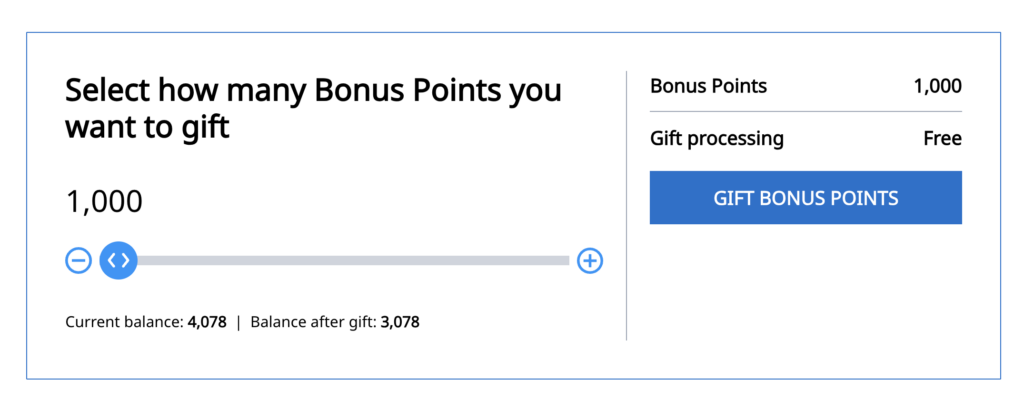
Credit: World of Hyatt
- Enter the recipient’s first name, last name, email address, and World of Hyatt membership number.
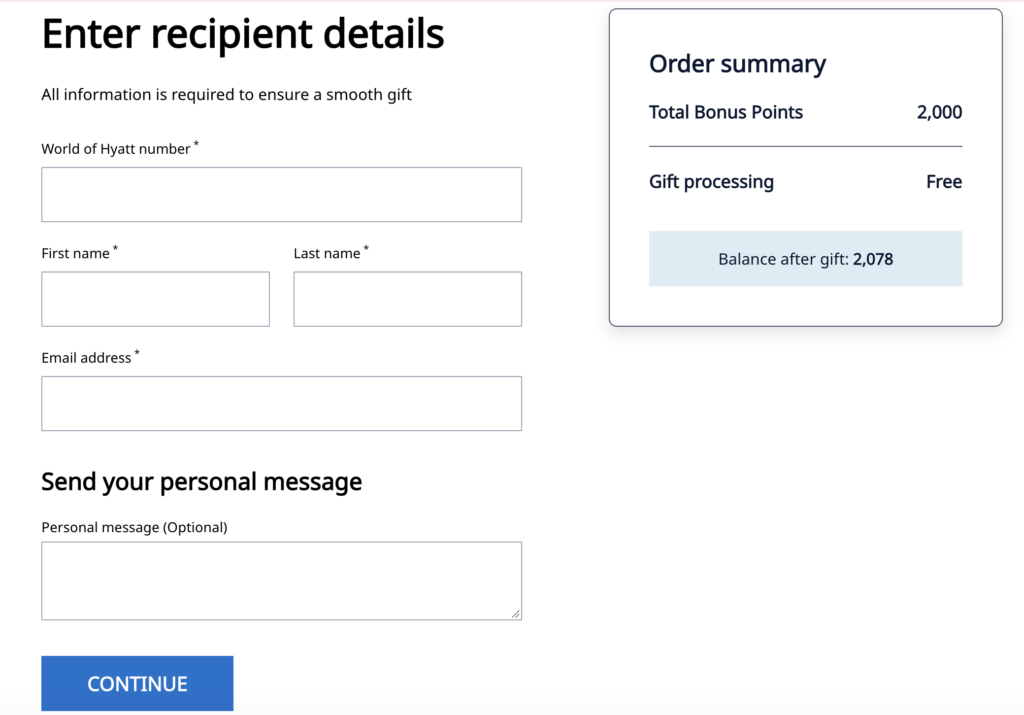
Credit: World of Hyatt
- Review the details and submit your transfer.
Hyatt says points generally arrive within 24 hours, although some members are reporting nearly instant transfers. Transactions requiring additional review could take up to ten business days.
Related: Your Complete Guide to World of Hyatt
A Few Rules To Know
Of course, Hyatt isn’t letting members move unlimited points between accounts. There are a handful of restrictions worth knowing:
- Transfers are free, and points can be moved at a 1:1 ratio.
- The minimum transfer is 1,000 points, with additional increments of 500 points.
- Both accounts must be at least 60 days old and in good standing.
- Members can send and receive up to 525,000 points total each per calendar year.
- Members can make one transfer per calendar month, up to six transfers per calendar year.
- You don’t have to be related to the recipient or live at the same address to share points.
Bottom Line
We don’t celebrate a hotel loyalty program for eliminating a PDF every day, but here we are. But jokes aside, this is a welcome change. Instead of jumping through hoops and waiting weeks for a transfer to process, members can now handle everything online.

Opinions, reviews, analyses & recommendations are the author’s alone, and have not been reviewed, endorsed or approved by any of these entities. American Express is a Points Talk Squad advertiser, but we always show the best public offer even when we don’t earn a commission. Terms Apply.
Leave a Reply


Advertiser Disclosure: Points Talk Squad has partnered with CardRatings for our coverage of credit card products. Points Talk Squad and CardRatings may receive a commission from card issuers when a customer clicks on a link, when an application is approved, or when an account is opened. This compensation may impact how or where products appear on this site. Points Talk Squad has not reviewed all available credit card offers on this site.
Editorial Note: Opinions expressed here are author's alone, not those of any bank, credit card issuer, hotel, airline, or other entity. This content has not been reviewed, approved or otherwise endorsed by any of the entities included within the post.
be the first to comment
Responses are not provided or commissioned by the bank advertiser. Responses have not been reviewed, approved or otherwise endorsed by the bank advertiser. It is not the bank advertiser’s responsibility to ensure all posts and/or questions are answered.